
ERA Products
Using the C-Form Relay on the ERA-DCRX Receiver
The ERA-DCRX receiver's C-Form relay can connect external devices that need separate power or control beyond the standard 12V DC outputs.
Published November 19, 2021
Understanding C-Form Relay Benefits
- No power rating limitations
- Functions as a versatile switch
- Multi-zone compatibility
- No 400mA current restriction
Zone Association Features
Flexible Configuration
- Compatible with all four zones
- Customizable zone combinations
- Independent operation
Installation Instructions
Preparation
- Disconnect power: unplug transformer and remove ERA-DCRX power
- Configure zone settings: locate DIP switches, set zone associations, verify switch positions
Wiring Configuration
- Connect device wiring: black wire to "NO" terminal, red wire to transformer, bridge transformer to "COM"
- Duration settings: reference Fig 1 diagram, set activation time, verify DIP switches
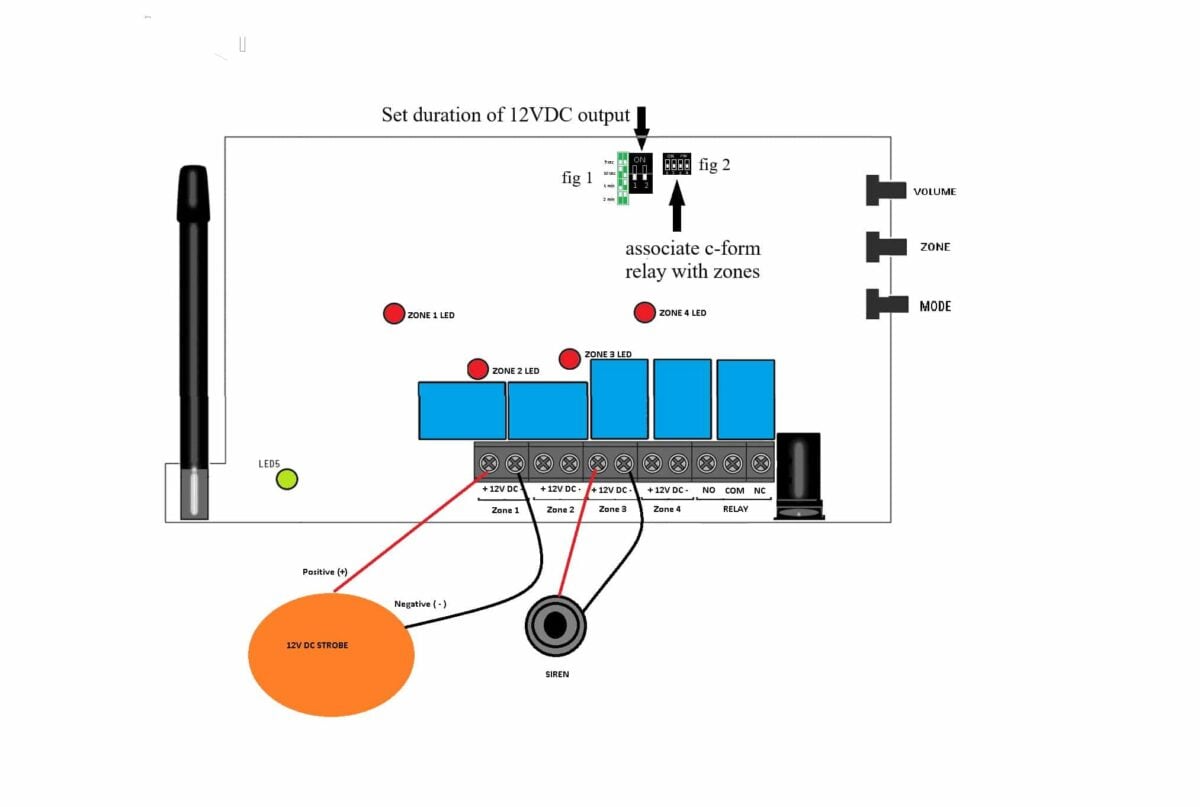
Testing and Verification
- Verify connections
- Test zone triggers
- Confirm timing settings
- Monitor device response
Where to go next
When this article answers part of your question, use these links to choose a receiver, find your product family, or browse the full catalog.
Browse FAQ categories
Jump straight to the product family and topic you need.
Learn moreBrowse all documentation
Open the full manual and article library when you need adjacent guides, wiring notes, or compatibility references.
Learn morePreview receiver sounds
Compare tones, sirens, and strobe-linked alerts before choosing a receiver or system.
Learn moreReturn to the product catalog
Head back to the catalog once you know which family or alert type fits the job.
Learn moreGet expert help
Reach the Safeguard team when the next decision still needs a human recommendation.
Learn more