
Connect DB-2000 Bell to ERA-DCRX Receiver for Enhanced Alert Volume
Connect a DB-2000 bell to your ERA-DCRX receiver for enhanced sound output in noisy commercial environments. The ERA-DCRX delivers 95 dBA at 5 feet and supports various 12V DC alerting devices.
Published March 28, 2023
System Capabilities
The ERA-DCRX stands out with its versatile connection options, featuring both a C-FORM relay and four 12V DC outputs. This flexibility allows you to integrate various alert devices including:
- Strobe lights for visual alerts
- External sirens for additional audio coverage
- Fire alarm bells for emergency notifications
- Any compatible 12V DC alerting device
Installation Steps
Initial Preparation
- Disconnect power from the ERA-DCRX receiver
- Carefully separate the receiver's case halves
- Locate the DB-2000's square cover on top

Accessing Connection Points
- Find the release tab on the DB-2000's square cover
- Press gently to release and remove the cover
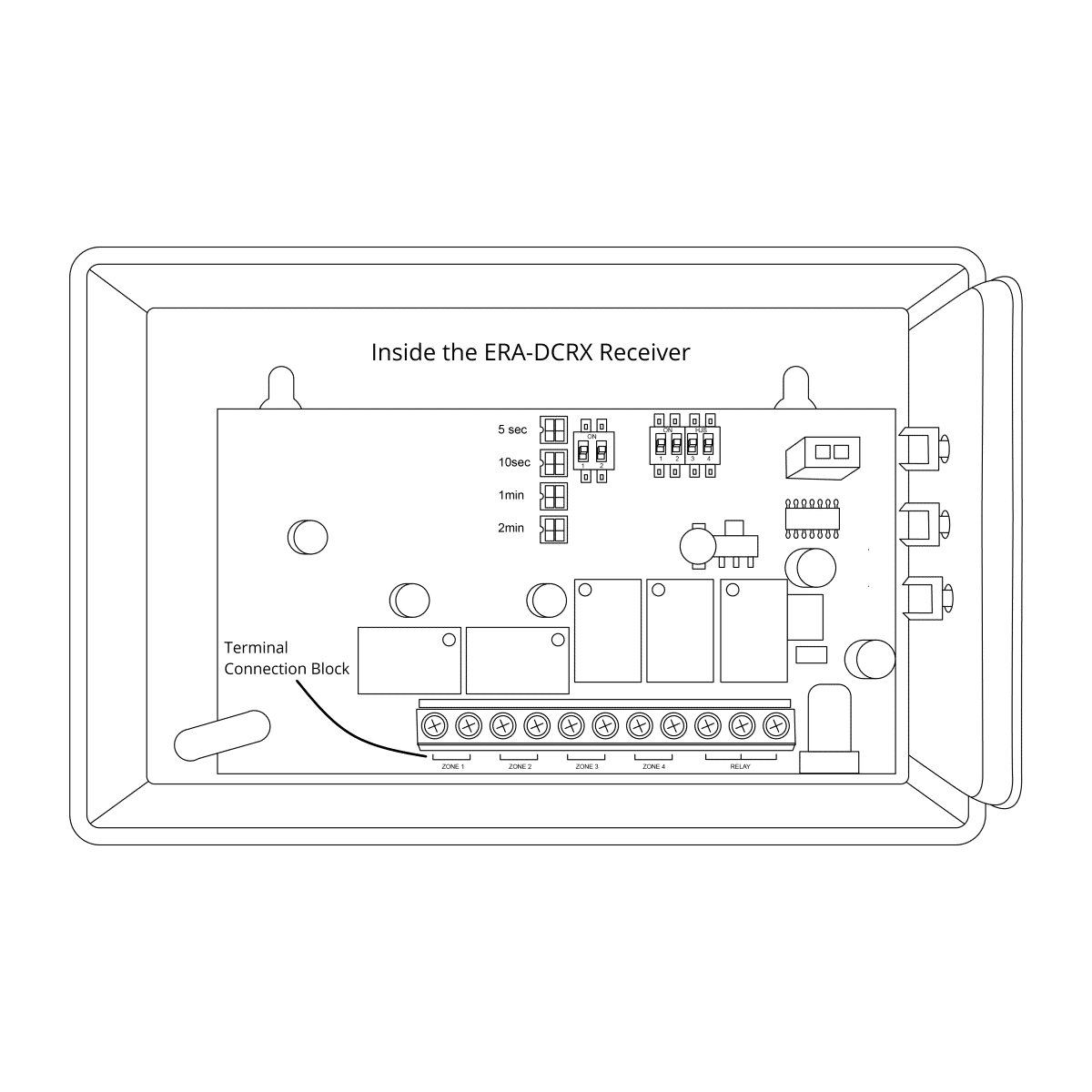
- On the ERA-DCRX, identify your target zone's 12V DC terminal block

Wiring Connection Process
- Locate and loosen the two terminal screws on the DB-2000
- Connect wires to both DB-2000 terminals, ensuring secure connections
- Route wires to your chosen ERA-DCRX zone terminal block
- Connect to the + and – terminals (polarity is not critical)
Final Configuration
- Set desired output duration using DIP switches
- Carefully reinstall all covers on both devices
- Review user manual for additional settings and options
- Test system functionality before finalizing installation
Where to go next
When this article answers part of your question, use these links to choose a receiver, find your product family, or browse the full catalog.
Browse FAQ categories
Jump straight to the product family and topic you need.
Learn moreBrowse all documentation
Open the full manual and article library when you need adjacent guides, wiring notes, or compatibility references.
Learn morePreview receiver sounds
Compare tones, sirens, and strobe-linked alerts before choosing a receiver or system.
Learn moreRead broader guidance
Move from the product-specific article into broader buying and troubleshooting guides when the issue spans multiple models or installs.
Learn moreReturn to the product catalog
Head back to the catalog once you know which family or alert type fits the job.
Learn moreGet expert help
Reach the Safeguard team when the next decision still needs a human recommendation.
Learn more