
How to Clear Event Logs on Your ERA-VPRX Receiver
The ERA-VPRX receiver stores up to 200 events per zone. This guide explains how to view and clear event logs when needed.
Published March 7, 2023
The ERA-VPRX receiver maintains detailed event histories, storing up to 200 events per zone. Each transmitter activation is logged, allowing you to track system usage effectively.
Before You Begin
- Locate the power button on the left side of your ERA-VPRX
- Press the button once
- Listen for a confirmation beep
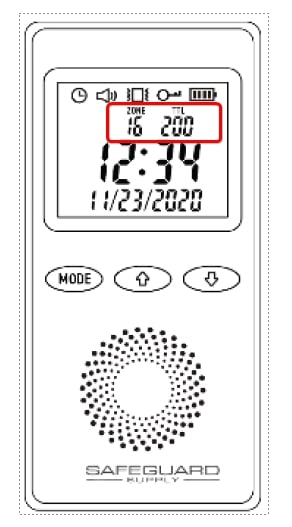
Accessing Event Logs
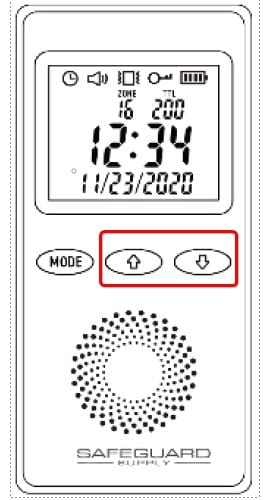
Step 1: Unlock the Keypad
- Press and hold both up and down arrows simultaneously
- Wait for the confirmation beep
- Release both buttons
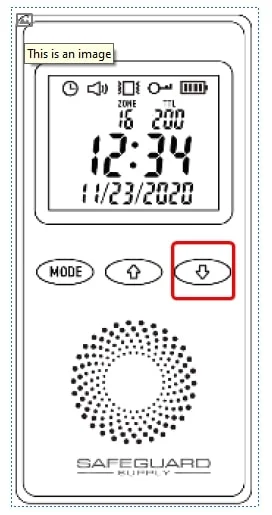
Step 2: Navigate Between Zones
- Use the down button to cycle through zones
- Each press reveals the TTL count for different zones
Clearing Event Logs
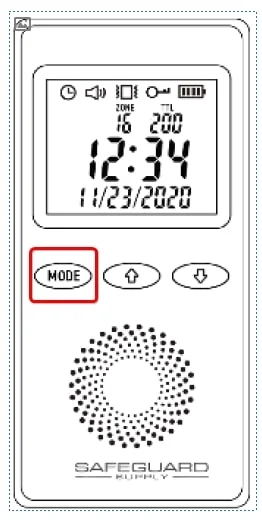
Step 1: Access Clear Mode
- Navigate to your target zone
- Press and hold the mode button for 2 seconds
- Wait for the confirmation beep
Step 2: Clear the Log
- Press and hold both mode and down buttons
- Wait for two confirmation beeps
- Verify the TTL display shows "000"
Where to go next
When this article answers part of your question, use these links to choose a receiver, find your product family, or browse the full catalog.
Browse FAQ categories
Jump straight to the product family and topic you need.
Learn moreBrowse all documentation
Open the full manual and article library when you need adjacent guides, wiring notes, or compatibility references.
Learn morePreview receiver sounds
Compare tones, sirens, and strobe-linked alerts before choosing a receiver or system.
Learn moreReturn to the product catalog
Head back to the catalog once you know which family or alert type fits the job.
Learn moreGet expert help
Reach the Safeguard team when the next decision still needs a human recommendation.
Learn more