
Extending ERA System Range Using Signal Relay Technology
Create a signal relay system using the ERA-UTX and ERA-DCRX's C-FORM relay to double your wireless alert system's range, extending coverage up to 8,000 ft while eliminating interference.
Published August 12, 2024
Real-World Application Example
Let's explore a common scenario where a business needs to extend their wireless alert coverage. The customer starts with a standard ERA-DCKIT package that includes:
- ERA-PBTX (wireless push button transmitter for entrance alerts)
- ERA-RXPG (plug-in receiver for alert notifications)
Common Challenges
- Signal degradation through metal structures or thick walls
- Inconsistent notifications in large facilities
- Dead zones in complex building layouts
Configuration Process
- Link your existing ERA-PBTX transmitter to the new ERA-DCRX receiver
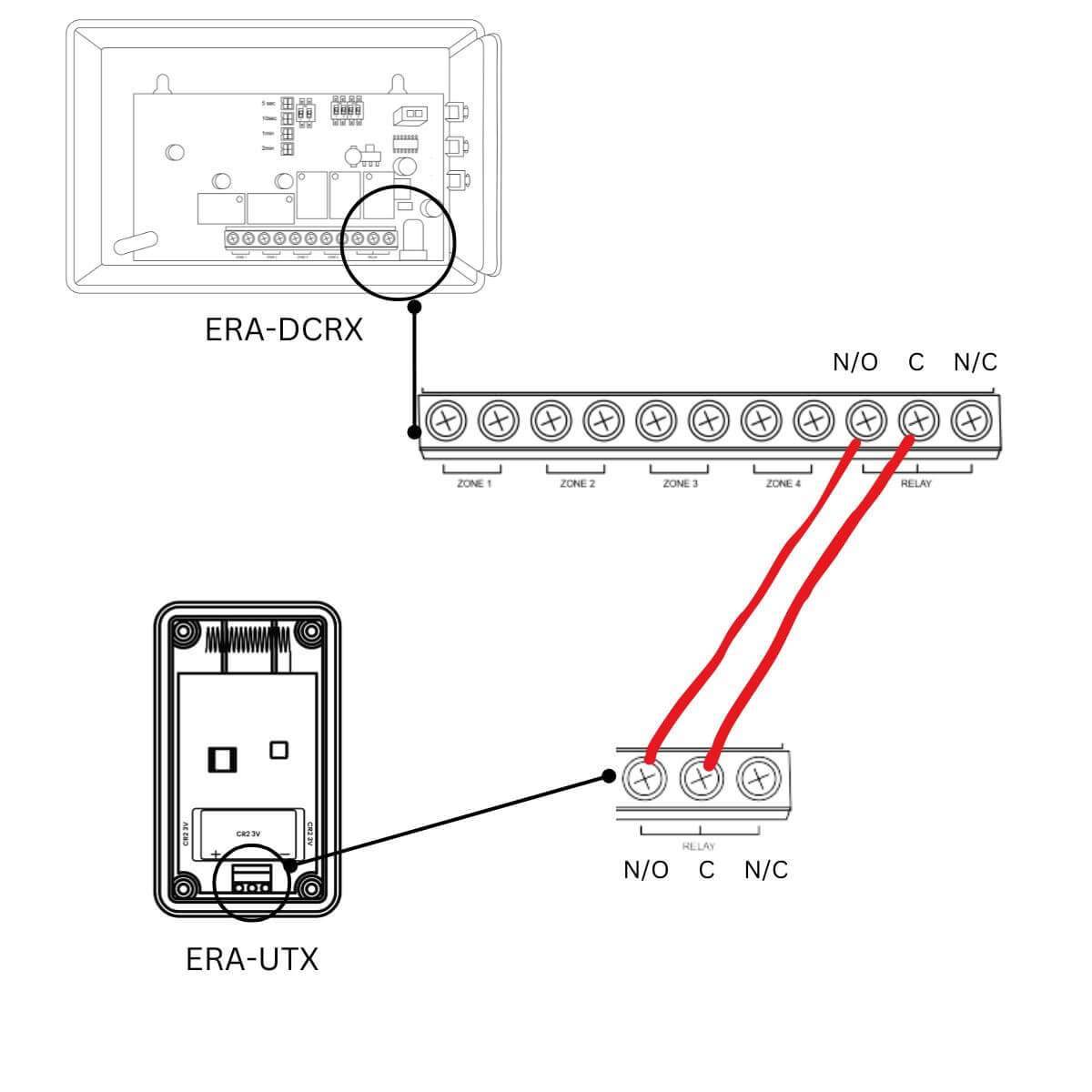
- Wire the ERA-UTX to the ERA-DCRX's C-FORM relay following our detailed instructions
- Program the ERA-UTX to communicate with your original ERA-RXPG receiver
Signal Relay Operation Sequence
- Activation begins when the ERA-PBTX transmitter is triggered
- The ERA-DCRX receives this initial signal and sounds its first alert
- The ERA-DCRX's C-FORM relay activates, triggering the connected ERA-UTX
- The ERA-UTX broadcasts a fresh, full-strength signal
- Your original ERA-RXPG receives this boosted signal and produces its alert
Where to go next
When this article answers part of your question, use these links to choose a receiver, find your product family, or browse the full catalog.
Browse FAQ categories
Jump straight to the product family and topic you need.
Learn moreBrowse all documentation
Open the full manual and article library when you need adjacent guides, wiring notes, or compatibility references.
Learn morePreview receiver sounds
Compare tones, sirens, and strobe-linked alerts before choosing a receiver or system.
Learn moreRead broader guidance
Move from the product-specific article into broader buying and troubleshooting guides when the issue spans multiple models or installs.
Learn moreReturn to the product catalog
Head back to the catalog once you know which family or alert type fits the job.
Learn moreGet expert help
Reach the Safeguard team when the next decision still needs a human recommendation.
Learn more