
How to Extend the Range of the ERA-DCRX by Up to 4,000 Ft
Use the ERA-EXTX to add up to 4,000 additional feet of coverage by creating a signal relay between two ERA-DCRX receivers.
Published September 23, 2022
Understanding the Setup
- Receiver 1: ERA-DCRX within range of original transmitter
- Receiver 2: ERA-DCRX at extended location
- ERA-EXTX range extender
Programming Extended Receiver
Step 1: Configure ERA-EXTX with Receiver 2
- Remove ERA-EXTX cover
- On Receiver 2: hold mode button (3 seconds), wait for zone 1 LED to flash, listen for confirmation tone
- On ERA-EXTX: verify battery installation, press "front" button, listen for success chime
- Exit programming: hold zone button (3 seconds), wait for confirmation tone
Wiring Configuration
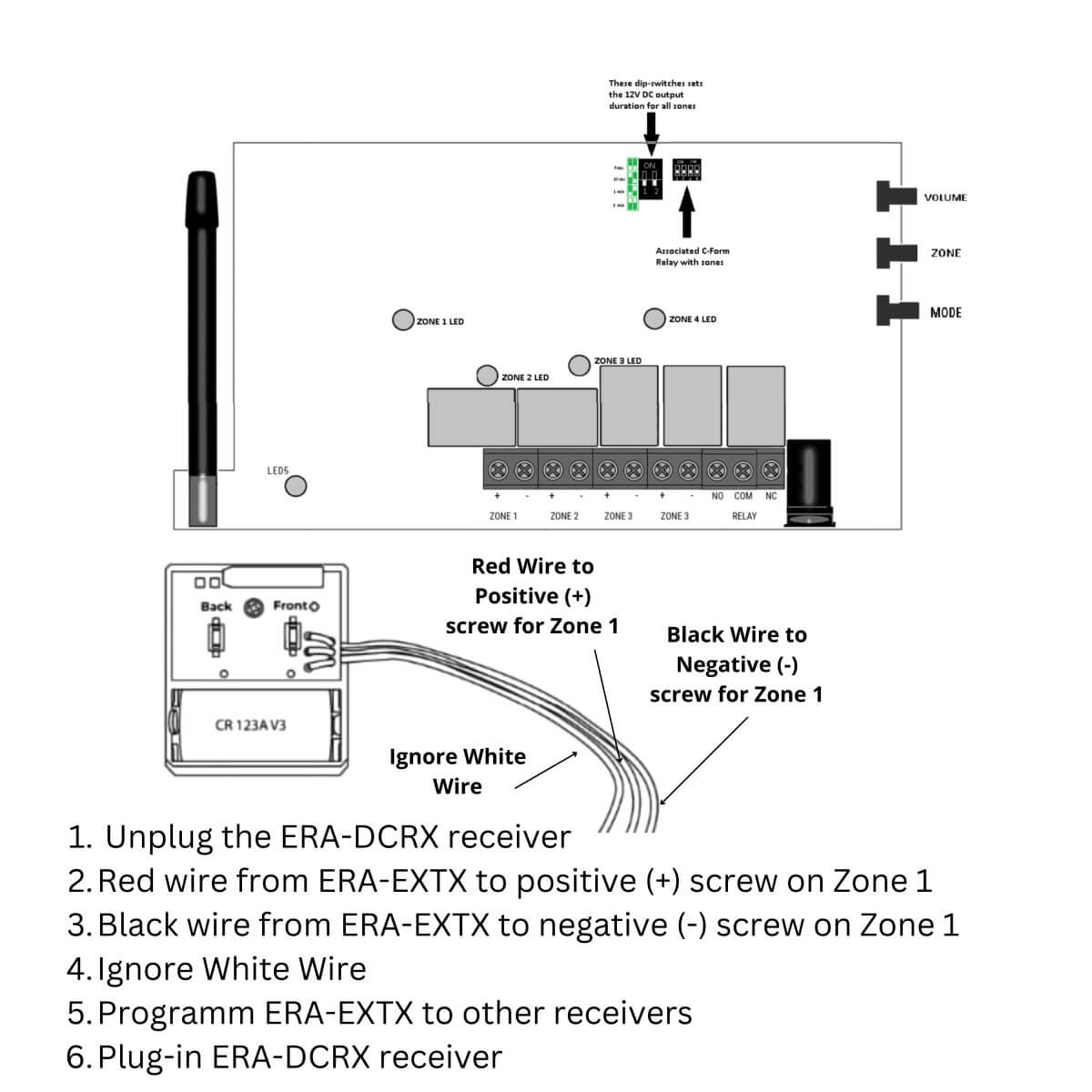
Step 2: Connect ERA-EXTX to Receiver 1
- Preparation: unplug Receiver 1, remove cover, prepare wires
- Wire connection: strip red and black wires, remove c-clamps, white wire not used
- Terminal connection: red wire to Zone 1 positive, black wire to Zone 1 negative, secure all connections
Final Setup
- Set output duration: locate DIP switches, set to 5-second duration, verify settings
- System testing: reconnect Receiver 1 power, trigger original transmitter, verify Receiver 1 chime, check ERA-EXTX LED, confirm Receiver 2 chime
Where to go next
When this article answers part of your question, use these links to choose a receiver, find your product family, or browse the full catalog.
Browse FAQ categories
Jump straight to the product family and topic you need.
Learn moreBrowse all documentation
Open the full manual and article library when you need adjacent guides, wiring notes, or compatibility references.
Learn morePreview receiver sounds
Compare tones, sirens, and strobe-linked alerts before choosing a receiver or system.
Learn moreRead broader guidance
Move from the product-specific article into broader buying and troubleshooting guides when the issue spans multiple models or installs.
Learn moreReturn to the product catalog
Head back to the catalog once you know which family or alert type fits the job.
Learn moreGet expert help
Reach the Safeguard team when the next decision still needs a human recommendation.
Learn more